


Building an online e-commerce is challenging and stressful. As you get started, you want to ensure you’ve made the right decisions and are using the best tools at your disposal. It’s not only about short-term goals but about long-term growth and how you can create a scalable online shop. One of the essential decisions you will face early on is about how you want to set up your online store. With many options, choosing the right one can seem complicated. That’s why we’ve created this Shopify vs Squarespace guide. To help you understand the differences between the two platforms so you can choose the one that suits you best with confidence.
What is Shopify?
Shopify is the largest e-commerce platform in the market, with over 4.5 million online shops. The platform focuses solely on e-commerce and makes continuous improvements to its functionalities based on the needs of e-commerce businesses.
Shopify is an all-in-one solution for online shops. It enables people to create their own e-commerce website and offers access to its payment system. It also gives access to its distribution network and discounts from selected delivery companies. In addition, there is a plethora of extra features and functionalities you can unlock with Shopify apps.
What is Squarespace?
Squarespace is a website hosting and creation service launched in 2013. It’s possible to create all kinds of websites with Squarespace, including online stores. Even though e-commerce websites are not the main Squarespace users amongst the millions existing, there are over 340,000 shops worldwide created with Squarespace, and this figure is continuously rising.
They offer the necessary tools to create an online store you can grow. You can create different designs to present your shop and products, manage inventory and shipping, and accept various payment methods. It also enables you to choose a personalized domain name, covers hosting, and guarantees the safety and security of your website. In addition to the website creator and basic e-commerce functionalities, it offers additional options. Like integrated email models and the possibility of integrating product reviews.
Shopify vs Squarespace: The basics
Both Shopify and Squarespace store data from websites in data centers in different locations (even though Squarespace uses a CDN with nods located only in the United States). They give websites SSL certificates and guarantee quick content load speeds adapted to different screen sizes.
But, even though both platforms enable freelancers to sell various types of products (physical or digital), Squarespace also offers a solution for freelancers looking to sell services based on subscriptions, like training sessions. You can also do so on Shopify. But Squarespace is more adapted if you want to sell access to certain content using a subscription. The platform has a dedicated member area functionality to define the type of price and other details. It also enables you to add appointment scheduling for clients to book appointments for your services.
Shopify, on the other hand, is much more optimized for selling physical products. It’s easy to manage products on the platform and create product pages or collections.
Shopify vs Squarespace: E-commerce creation
Squarespace
Many businesses choose Squarespace because it’s a much easier platform to use. The website creation process is quite simple. Squarespace will guide you with ready-to-use templates that you can filter by category. You will be able to create a website with a specific design and have a selection of sections to use or forego based on your needs.
You can add homepage elements and choose the pages you wish to have on your website (about us, contact page, and other essential pages), then add the color chart and typeface you want. The checkout page can also be personalized with different colors and elements.
Squarespace offers over 100 website templates. But most of them are not adapted to e-commerce. If you need advanced functions not included by default, you can buy an external Squarespace template. You will find some examples of templates for sale here.
Shopify
Shopify also has a simple and easy-to-use drag-and-drop editor in which you can slide the website sections you want to add to your web page. You have to pay a one-time purchase fee for most themes, but there are also some decent free options. You can also buy external themes. So, you have a wide variety of options with additional functions that you can implement with plugins and apps.
In Shopify’s theme editor, you can control the sections displayed on each page, personalize the colors and typeface, and use additional parameters. For example, you can add an “Add to cart” call-to-action on collection pages or make it so the second product image appears when people hover over the product.
Besides the native theme editor, you can find an app to create pages that include additional themes and elements to personalize your e-commerce and improve conversions.
In addition, Shopify offers thousands of apps that can help you make your e-commerce website more attractive and grow your sales. For example, you can add a countdown to products or sales events, control the appearance of product variants, or let visitors zoom in on product photos.
This is where Shopify differentiates itself. Squarespace doesn’t offer many internal apps, with only around 31 extensions in its library. They are not connected to the e-commerce website creation either. The platform offers certain features that can be added easily. Like badges for products, blocs for related products, product reviews, and alerts for low stocks.
Finally, both Squarespace and Shopify enable you to add code on the client side (like personalized CSS code).
Shopify vs Squarespace: SEO and marketing
SEO referencing
It’s essential to follow best practices for SEO referencing to survive in a saturated market. So, it’s vital to understand what each platform offers and what tools they make available to help you boost your results with SEO. Both Shopify and Squarespace cover fundamental SEO elements such as website speed optimization, image compression, sitemap, automatic tags, and URL structure. The platforms also offer referencing fields to fill out URL slugs, titles, and description tags for different pages.
Like most e-commerce website creators, you can connect Squarespace and Shopify to Google Analytics and Google Search Console easily. In addition, Squarespace extracts data from GSC to present a dashboard that tracks your site’s progression in keyword rankings.
Squarespace offers additional referencing tools. It helps to use local referencing tools to manage your Google company profile and its appearance in local results. It also offers a checklist of everything that needs to be covered and suggests hiring SEO experts to complete more complex tasks.
Email marketing
Both platforms have email automation features with advantages and inconveniences. Squarespace offers pre-written emails for back-in-stock product notifications, review requests, cart abandoners, and updates for subscriptions. It has a client notification editor to modify email templates and visualize them. Squarespace also gives you a dashboard where you can manage newsletter subscribers, create segments, and make personalized email campaigns. The platform also offers a feature to easily integrate places where people can sign up for the newsletter.
Shopify also offers simple emails, although emails are not all in one place and are in code. Even though Squarespace native email tool is much easier to use, Shopify offers various integrations with email marketing apps and tools. Like Klaviyo. Leveraging these apps and tools could help you get the best results from your email marketing.
Shopify vs Squarespace: Payment processing
Squarespace
Payment processing might be Squarespace biggest weakness. You can only connect Squarespace to Stripe and PayPal, which are limited in terms of accepted payment methods and are not accepted everywhere in the world. Squarespace focuses on freelancers located in the United States because they are the ones who have the most payment options, including the integration to Squarespace’s sales point. So, if you’re in the U.S., Squarespace’s payment processing imitations might not be an issue. But if you’re not, there are better solutions for you.
In terms of currencies, Squarespace only covers 26 currencies, including some that are covered only on Stripe. And more importantly, you cannot have a multi-currency e-commerce. You need to choose one single currency. There is an external extension to display the prices of geographical currencies, but clients will still only be able to pay in the online shop’s main currency.
There might also be some transaction fees to consider, as Squarespace charges around 3% on sales, but it also depends on the payment methods used and the plan you’re under. Here’s a full breakdown of Squarespace fees:

Shopify
Shopify is more convenient for international freelancers and more flexible with payment methods. The platform supports over 100 payment solutions. Including those enabling to accelerate the payment. It also offers its system, Shopify Payments, with no transaction fees. They also have a native solution called Shop Pay for quick payments.
With Shopify, e-commerce websites can easily localize their offers. Multi-currency shops can personalize their prices for each market.
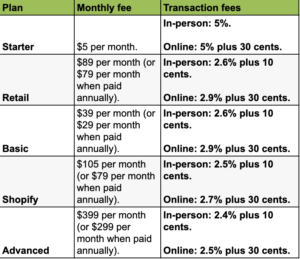
Shopify also charges transaction fees. They depend on the plan you are using. You can find the full breakdown here:
Consider taxes
Regardless of where you are, you need to consider the taxes. Shopify is much more helpful in that sense. You can control your taxes on the platform by defining tax rules by product, delivery destination, or client. It’s especially helpful if you’re selling in multiple countries, including Europe, where tax rules can get complicated with so many countries to consider. In addition, the platform has a Shopify Tax feature that automatically calculates taxes for sales in the United States.
On Squarespace, you can’t define taxes by product. This can make it difficult if you’re looking to sell in Europe or somewhere that has variable tax laws. You can always manually define the international tax rates, and for the United States, you can use TaxJar to automate your tax process.
Shopify vs Squarespace: Data & analytics
Data and analytics are crucial to help you grow your business and identify the best opportunities. Both platforms give you access to data that you can leverage.
Shopify
Shopify gives you access to data and analytics dashboards. Your access and the flexibility of the data you get depend on which plan you subscribe to. In the basic plan, you won’t have the sales report or the option to create personalized reports. You need the Advanced or Shopify Plus plans for those. Shopify offers more data breakdowns and reports than Squarespace. There are multiple reports on inventory, marketing, and clients to help segment your clients to create more personalized campaigns. Lastly, Shopify enables you to export your reports. That’s something Squarespace does not offer.
Squarespace
The platform shares various reports and data with you based on plans, just like Shopify. You can have access to analytics reports, website traffic, sales, purchase funnel, and abandoned carts. The Commerce Basic plan includes a report on the sales per product, and Commerce Advanced adds information about cart abandoners. Graphs can be filtered and visualized based on different factors wherever you are, thanks to a mobile app. If you have multiple people working on the website, you can also manage their access permission to withdraw or give access to data.
Shopify vs Squarespace: Subscription payment plans
Shopify
Shopify’s plans are considerably more expensive. There are various plans ranging from Starter ($5 per month) to Advanced ($399 per month). You can also get a discount if you take an annual plan instead of the monthly plan. In addition, the transaction fees will decrease based on the plan you take. With the Starter plan, it is 5% of sales, but with the Advanced plan, it goes down to 2.5% plus 30 cents. The different advantages of each plan vary and give you access to more analytics and data, more accounts for staff, and other features.
Here is a breakdown of the different plans:
Squarespace
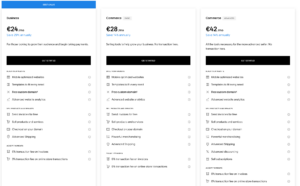
Squarespace has three different subscription plans for online shops. The plans are:
- Business for $24 per month.
- Commerce Basic for $28 per month.
- Commerce Advanced for $42 per month.
You can get a significant discount if you subscribe to an annual plan instead of a monthly one. In addition, you will get a free custom domain if you subscribe to the yearly plan. It’s essential to use the annual plan.
The main difference between the Business and Commerce plans is that you will have a lower transaction fee with the Commerce plans. In addition, Commerce plans also give you merchandising advantages like blocking related products and stock alerts to make sure you can replenish stocks in time). The Advanced plan also has more advanced delivery options with the possibility of offering free delivery after a certain amount has been spent, more personalized discounts, and the possibility to sell subscriptions (it’s the only plan that enables subscriptions).
Here is a breakdown of the different plans:
Grow your e-commerce with ComeUp
Starting your e-commerce website on your own can be stressful and challenging. There are many things to do and so much to learn. But there’s no need to feel overwhelmed. With ComeUp, you can get help from thousands of freelancers and complete your projects with the best results. ComeUp is a freelance marketplace platform on which freelancers sell their services. You can browse the platform or use the search bar to find the service you need. After that, you can simply order a service or contact the freelancer.
There are many reasons why ComeUp is the best freelance marketplace to work with freelancers. Firstly, with ComeUp, you’re guaranteed to get what you order. When you place an order, you pay for it upfront, but the money goes into an escrow account. The freelancer only gets paid when they have delivered the order and you approve it. This makes for a safe and secure order process, and the platform is optimized to facilitate the collaboration between clients and freelancers.
The platform has some of the best customer service in the industry and is rated 4.3 stars out of 5 on Trustpilot (as of June 2025), thanks to the customer service team. In addition, it is one of the best platforms in terms of working conditions for freelancers, as they were voted the platform with the best working conditions by a Fairwork study in 2025.
Gain efficiency and complete all your projects with the best results, thanks to ComeUp. Access the expertise of thousands of freelance experts. You can find business development, e-commerce optimization, marketing and SEO, design, web development, and all kinds of other services to help you grow your business. Try ComeUp today!
Shopify vs Squarespace: Conclusion
Now you know the differences and advantages of Shopify and Squarespace. You can decide which platform you want to use to start and grow your e-commerce website. Whichever you choose. Consider which platform will work with your business model best and allow it to scale efficiently. Both Shopify and Squarespace are great for building an e-commerce website. Despite that, Shopify is often the preferred option because it is optimized for e-commerce. With ComeUp, you can find all kinds of services to launch your business faster and grow it more rapidly and efficiently. You now have access to thousands of professional freelancers with the expertise to generate great results for your business.